- Define A Message Type
- What’s Generated From Your .proto?
- Scalar Type
- Enumerations
- Using Other Message Types
- Nested Types
- Packages
- Options
- Generating Classes
Protocol buffers are Google’s language-neutral, platform-neutral, extensible mechanism for serializing structured data – think XML, but smaller, faster, and simpler. You define how you want your data to be structured once, then you can use special generated source code to easily write and read your structured data to and from a variety of data streams and using a variety of languages.
You can get it from Developer Google
Define A Message Type
Here’s the .proto file you use to define the message type.
message SearchRequest {
  required string query = 1;
  optional int32 page_number = 2; // Which page number do we want?
  optional int32 result_per_page = 3;
}
The SearchRequest message definition specifies three fields (name/value pairs), one for each piece of data that you want to include in this type of message. Each field has a name and a type.
Specifying Field Types
In the above example, all the fields are scalar types: two integers (page_number and result_per_page) and a string (query). However, you can also specify composite types for your fields, including enumerations and other message types.
Assigning Tags
Each field in the message definition has a unique numbered tag. These tags are used to identify your fields in the message binary format, and should not be changed once your message type is in use. Note that tags with values in the range 1 through 15 take one byte to encode, including the identifying number and the field’s type. Tags in the range 16 through 2047 take two bytes. So you should reserve the tags 1 through 15 for very frequently occurring message elements. Remember to leave some room for frequently occurring elements that might be added in the future.
### Specifying Field Rules
You specify that message fields are one of the following:
-
required: a well-formed message must have exactly one of this field.
-
optional: a well-formed message can have zero or one of this field (but not more than one). optinoal to set default value:
optional int32 result_per_page = 3 [default = 10];
- repeated: this field can be repeated any number of times (including zero) in a well-formed message. The order of the repeated values will be preserved.
What’s Generated From Your .proto?
When you run the protocol buffer compiler on a .proto, the compiler generates the code in your chosen language you’ll need to work with the message types you’ve described in the file, including getting and setting field values, serializing your messages to an output stream, and parsing your messages from an input stream.
-
For C++, the compiler generates a .h and .cc file from each .proto, with a class for each message type described in your file.
-
For Java, the compiler generates a .java file with a class for each message type, as well as a special Builder classes for creating message class instances.
-
Python is a little different – the Python compiler generates a module with a static descriptor of each message type in your .proto, which is then used with a metaclass to create the necessary Python data access class at runtime.
-
For Go, the compiler generates a .pb.go file with a type for each message type in your file.
Scalar Type
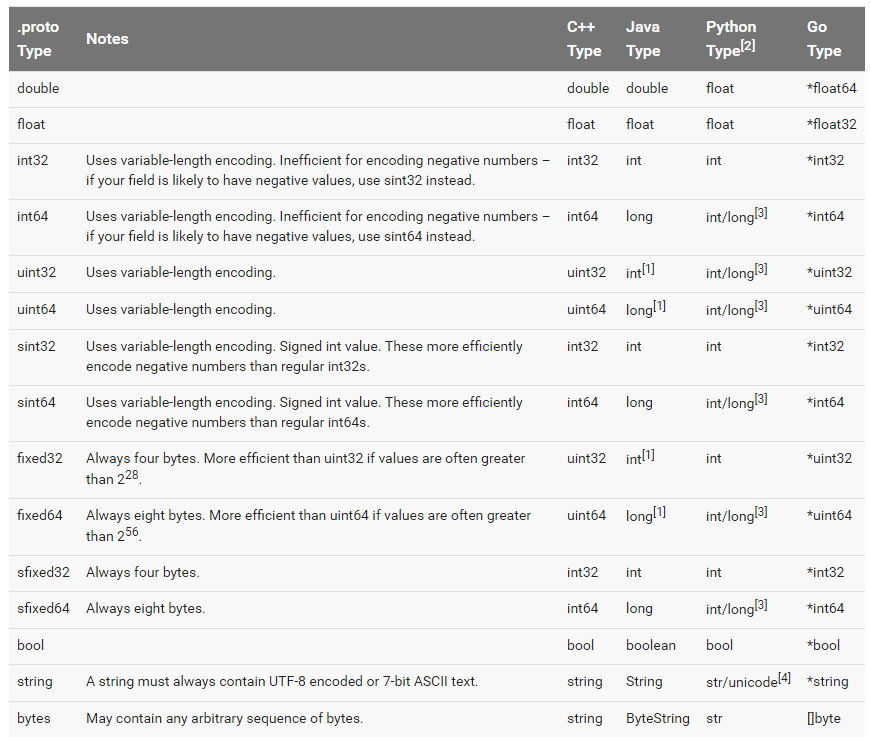
You can get more encoding from Encoding
Enumerations
For example, let’s say you want to add a corpus field for each SearchRequest, where the corpus can be UNIVERSAL, WEB, IMAGES, LOCAL, NEWS, PRODUCTS or VIDEO. You can do this very simply by adding an enum to your message definition - a field with an enum type can only have one of a specified set of constants as its value (if you try to provide a different value, the parser will treat it like an unknown field). In the following example we’ve added an enum called Corpus with all the possible values, and a field of type Corpus:
message SearchRequest {
  required string query = 1;
  optional int32 page_number = 2;
  optional int32 result_per_page = 3 [default = 10];
  enum Corpus {
    UNIVERSAL = 0;
    WEB = 1;
    IMAGES = 2;
    LOCAL = 3;
    NEWS = 4;
    PRODUCTS = 5;
    VIDEO = 6;
  }
  optional Corpus corpus = 4 [default = UNIVERSAL];
}
Using Other Message Types
If you wanted to include Result messages in each SearchResponse message – to do this, you can define a Result message type in the same .proto and then specify a field of type Result in SearchResponse:
Importing Definitions
In the above example, the Result message type is defined in the same file as SearchResponse – what if the message type you want to use as a field type is already defined in another .proto file?
You can use definitions from other .proto files by importing them. To import another .proto’s definitions, you add an import statement to the top of your file:
import "myproject/other_protos.proto";
Nested Types
message SearchResponse {
  message Result {
    required string url = 1;
    optional string title = 2;
    repeated string snippets = 3;
  }
  repeated Result result = 1;
}
Packages
You can add an optional package specifier to a .proto file to prevent name clashes between protocol message types.
package foo.bar;
message Open { ... }
You can then use the package specifier when defining fields of your message type:
message Foo {
  ...
  required foo.bar.Open open = 1;
  ...
}
The way a package specifier affects the generated code depends on your chosen language:
-
In C++ the generated classes are wrapped inside a C++ namespace. For example, Open would be in the namespace foo::bar.
-
In Java, the package is used as the Java package, unless you explicitly provide a option java_package in your .proto file.
-
In Python, the package directive is ignored, since Python modules are organized according to their location in the file system.
Options
Individual declarations in a .proto file can be annotated with a number of options. Options do not change the overall meaning of a declaration, but may affect the way it is handled in a particular context. The complete list of available options is defined in google/protobuf/descriptor.proto.
Here are a few of the most commonly used options:
java_package (file option): The package you want to use for your generated Java classes. If no explicit java_package option is given in the .proto file, then by default the proto package (specified using the “package” keyword in the .proto file) will be used. However, proto packages generally do not make good Java packages since proto packages are not expected to start with reverse domain names. If not generating Java code, this option has no effect.
option java_package = "com.example.foo";
java_outer_classname (file option): The class name for the outermost Java class (and hence the file name) you want to generate. If no explicit java_outer_classname is specified in the .proto file, the class name will be constructed by converting the .proto file name to camel-case (so foo_bar.proto becomes FooBar.java). If not generating Java code, this option has no effect.
option java_outer_classname = "Ponycopter";
Generating Classes
The Protocol Compiler is invoked as follows:
protoc --proto_path=IMPORT_PATH --cpp_out=DST_DIR --java_out=DST_DIR --python_out=DST_DIR path/to/file.proto
You can provide one or more output directives:
-
--cpp_outgenerates C++ code inDST_DIR. See the C++ generated code reference for more. -
--java_outgenerates Java code inDST_DIR. See the Java generated code reference for more. -
--python_outgenerates Python code inDST_DIR. See the Python generated code reference for more.